
Digital cards update automatically through secure token exchanges and network communication that refresh card credentials and contact details without any manual input. This process sits at the heart of how digital cards work, and understanding it helps you get far more from the technology. Whether you use a digital wallet for payments or a digital business card for networking, the automatic update mechanism relies on tokenisation, card network infrastructure, and increasingly, AI-powered contact management. Lynko builds these principles directly into its NFC business card platform, giving professionals a live, always-accurate digital profile they can share with a single tap.
How do digital cards update automatically?
Automatic digital card updates work through a combination of tokenisation, card network APIs, and Account Updater services. When your card details change, such as after a renewal or reissue, these systems communicate the new credentials to every connected merchant or wallet without you lifting a finger.
Tokenisation is the foundation. It replaces your real card number with a device-specific token. Tokens reside only on devices or card networks, and they can be revoked individually without affecting the physical card. This means a single token update propagates across all connected services instantly.

The Automatic Account Updater (AAU) service, offered by networks including Visa and Mastercard, sits on top of this. AAU services refresh expired or replaced card credentials in merchant systems before billing cycles run. The result is that your subscriptions and recurring payments continue without interruption, even when your physical card changes.
PCI DSS compliance governs the entire process. Every party in the chain, from issuing banks to merchant gateways, must meet these standards. That compliance requirement is what makes the automatic syncing process trustworthy rather than merely convenient.
What technical processes enable automatic updates?
The technical workflow behind the digital card syncing process involves several layers working in sequence. Understanding each layer clarifies why the system is both fast and secure.
Batch processing vs real-time updates
AAU services traditionally run on a batch cycle, querying card networks overnight before a billing run. Real-time updates go further. Gateways can instantly query card networks after a failed transaction, retrying payments with updated data in milliseconds. This reduces manual retries and speeds up settlement time considerably.
The communication chain
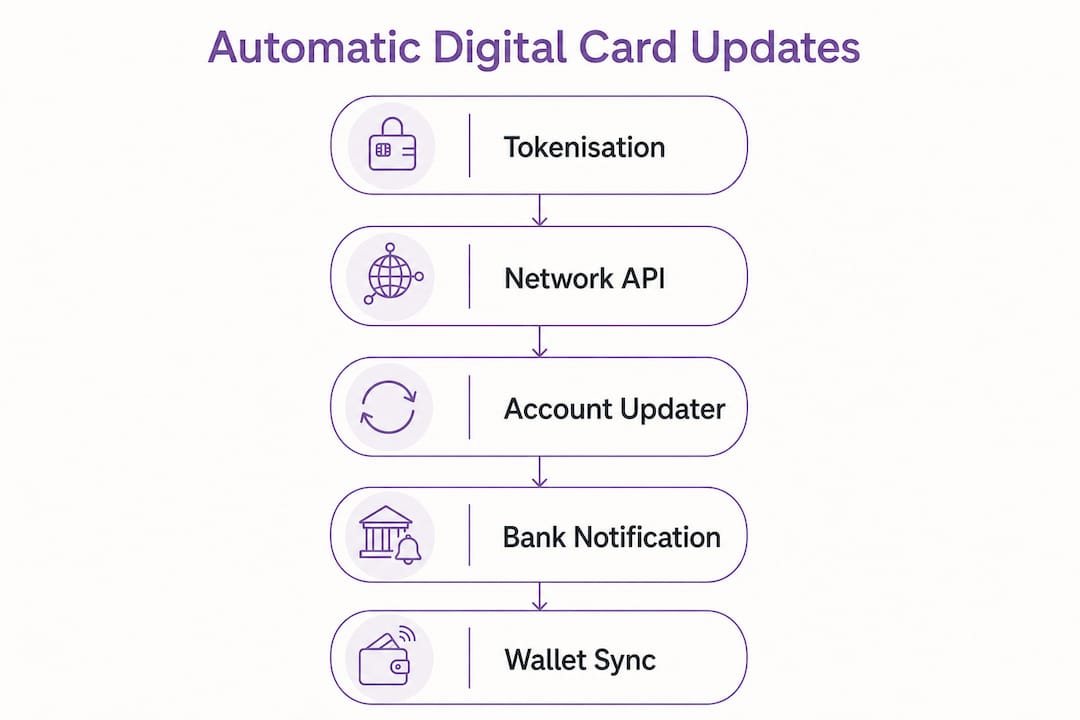
The update flow moves in a clear direction: the issuing bank notifies the card network of a change, the network updates its records, and the merchant gateway pulls the new data via API. No human intervention is needed at any point. Declined transactions and closed accounts trigger their own flags within this chain, preventing repeated failed charges and protecting both merchant and cardholder.
Token security and PCI compliance
Tokenisation ensures merchants never see customers' real card numbers, greatly reducing fraud risk from data breaches. Tokens are merchant-specific and device-specific, making them useless if intercepted. This architecture is what allows the digital card syncing process to happen at scale without creating new security vulnerabilities.
- Card networks query issuing banks for updated credentials before each billing cycle.
- API calls between gateways and networks happen in real time after transaction failures.
- Tokens are revoked and reissued when a card is replaced, with no disruption to the merchant relationship.
- Brand migrations, such as a card moving from Visa to Mastercard, are handled automatically by updating card brand metadata.
- Closed accounts are flagged immediately, stopping further charge attempts.
Pro Tip: If you manage recurring billing, confirm your payment gateway supports real-time AAU queries rather than batch-only updates. Real-time querying cuts failed payment rates far more effectively than overnight batch processing alone.
How do digital wallets manage updated card information?
Digital wallets such as Apple Pay and Google Pay add another layer to the automatic update process. They do not simply store card numbers. They store tokens, and those tokens are managed through a provisioning process that involves your issuing bank directly.
Here is how the provisioning and update flow works:
- Card addition. Push provisioning inside issuer apps lets you add a card to your wallet without manual entry. You tap "Add to Wallet" and encrypted data is handled entirely by backend systems between the issuer and the wallet provider.
- Issuer verification. Before the token is provisioned to your device, issuers conduct multi-factor authentication to confirm your identity. This step maintains high security and user control during automatic updates.
- Token activation. Once verified, a device-specific token is activated on your handset. This token is what gets presented at payment terminals, never your actual card number.
- Card replacement. When your physical card is replaced, the old token is deactivated and a new one is provisioned automatically. You do not need to re-enter your card details in every app.
- Phone upgrade. Switching devices triggers token deactivation on the old handset and reactivation on the new one, again without manual re-entry.
The security advantage here is significant. Because tokens are merchant and device-specific and useless if intercepted, a data breach at a retailer exposes nothing of value. The real card number never leaves the issuing bank's systems.
Pro Tip: When upgrading your phone, restore from a backup through your wallet provider's recommended method. This triggers automatic token reactivation rather than forcing you to re-add every card manually.
What advanced features support intelligent automatic updates?
The automatic update story does not stop at payment credentials. Digital business cards, the kind used for professional networking, are developing their own intelligent update layer powered by AI.
AI Agents now handle contact categorisation and profile enrichment automatically. AI Agents in digital cards auto-categorise contacts and enrich profiles with external data, providing voice-activated concierge services for managing your professional network. You can ask a voice or text interface to filter contacts by industry, find a specific connection, or update your own profile details, and the system handles it without manual sorting.
This matters for professionals who accumulate hundreds of contacts. Manual management of that data is error-prone and time-consuming. AI-driven enrichment pulls in publicly available professional data to keep profiles current, so your network stays accurate even when contacts change roles or companies.
The benefits of contactless business cards extend further when combined with calendar and meeting integrations. Some platforms can automatically log a new contact after a meeting, tag them by context, and suggest follow-up actions. Privacy-first approaches let you control exactly which data fields are shared with each contact, so automatic updates never mean oversharing.
- AI categorises new contacts by industry, role, or meeting context without manual input.
- Profile enrichment pulls external professional data to keep your network accurate.
- Voice and text commands let you query or update your network hands-free.
- Calendar integrations log new contacts automatically after scheduled meetings.
- Selective data sharing lets you control which fields update for which audience.
What are the benefits of automatic digital card updates for users?
The practical advantages of real-time digital card updates fall into three clear categories: fewer payment failures, better networking accuracy, and stronger security.
Payment continuity. Subscription services are the clearest beneficiary. Without AAU, a card renewal triggers a cascade of failed charges, manual re-entry requests, and potential service interruptions. With automatic updates, the merchant's system receives the new credentials before the next billing date. Involuntary churn in subscription revenue is reduced directly by this mechanism.
Networking accuracy. For professionals, an outdated business card is a credibility problem. A digital card that updates automatically means every contact who has your profile always sees your current job title, phone number, and social links. There is no version control problem, no stale PDF circulating in someone's inbox. Lynko's platform reflects this principle: when you update your profile, every person who has tapped your card sees the change immediately.
Security improvements. Automatic updates reduce the window during which old credentials remain active. A replaced card's token is deactivated promptly, cutting the risk of fraudulent use of old card data. The tokenisation layer means that even if a merchant's database is compromised, the attacker gains nothing usable.
The table below summarises the key use cases and their primary benefit:
| Use case | Primary benefit |
|---|---|
| Subscription billing | Prevents failed charges after card renewal |
| Mobile payments | Token reactivation on new device without re-entry |
| Professional networking | Live profile updates reach all contacts instantly |
| Corporate card management | Bulk credential updates across all employees |
| Security incident response | Instant token revocation limits fraud exposure |
Key takeaways
Digital cards update automatically by combining tokenisation, card network APIs, and Account Updater services to refresh credentials and contact details without any manual input.
| Point | Details |
|---|---|
| Tokenisation is the core mechanism | Device-specific tokens replace real card numbers and update across all connected services instantly. |
| AAU services prevent payment failures | Account Updater services query card networks before billing cycles, eliminating involuntary subscription churn. |
| Digital wallets use multi-step provisioning | Issuers verify identity, provision a token, and manage reactivation automatically during card replacements or device upgrades. |
| AI agents enhance business card updates | AI categorises contacts, enriches profiles, and handles voice queries to keep professional networks accurate. |
| Security improves with every update | Token revocation and PCI-compliant workflows mean old credentials become useless the moment a card is replaced. |
Why automatic updates matter more than most people realise
Most people assume automatic updates are just a convenience feature. They are not. They are a security architecture. The moment you understand that your wallet never stores your real card number, and that every update is a token exchange rather than a credential transfer, you start to see why manual management of card details is not just inconvenient. It is genuinely riskier.
I have watched professionals hand out paper business cards at events, then spend weeks chasing contacts to send updated details after a job change. The problem is not laziness. The problem is that paper cards have no update mechanism at all. A digital card with automatic syncing solves this at the infrastructure level, not the behaviour level. You do not need to remember to update anything. The system does it.
The AI layer is where things get genuinely interesting. AI agents managing digital card networks are not a distant prospect. They exist now, handling categorisation and enrichment tasks that would take a human hours per week. For anyone building a professional network seriously, this is the feature worth paying attention to in 2026.
My advice is straightforward. Do not treat your digital card as a static document. Treat it as a live record. Update your profile when anything changes, and let the platform's automatic syncing handle the distribution. The technology is built for exactly that.
— Olivier
Lynko's digital cards keep your profile current automatically
Lynko's NFC business cards are built around the principle that your contact information should always be accurate, for every person who has ever tapped your card. When you update your Lynko profile, the change reaches your entire network instantly. No reprints, no follow-up emails, no outdated details circulating after a job change.
Lynko's platform is GDPR-compliant and designed for professionals who need both control and efficiency. You choose which data fields to share, and the platform handles the syncing. With unlimited social links, Google Reviews integration, and customisable profile modules, Lynko gives you a digital business card that works as hard as you do. Tap to share, update once, and stay current everywhere.
FAQ
How do digital cards update without manual input?
Digital cards use tokenisation and Account Updater services to refresh credentials automatically. Card networks communicate changes to merchant systems and digital wallets before the user notices anything has changed.
What is tokenisation in digital card updates?
Tokenisation replaces your real card number with a device-specific token. When your card is renewed or replaced, the old token is deactivated and a new one is issued, with no action required from you.
Do digital business cards update for all contacts at once?
Yes. When you update a digital business card profile, the change is reflected immediately for every contact who holds your card link. There is no need to redistribute or resend anything.
Are automatic digital card updates secure?
Automatic updates are more secure than manual ones. Tokens are useless if intercepted, and PCI DSS compliance governs every step of the update process, from the issuing bank to the merchant gateway.
How does Lynko handle automatic profile updates?
Lynko updates your digital profile in real time across your entire network the moment you make a change. Every person who has tapped your Lynko card sees the updated information immediately, with no version control issues.